Progress Isn’t Linear, in Martial Arts or Cybersecurity

musashi

The Myth of Linear Progress

We often imagine progress as, although slow, always moving upward. Reality is less predictable.

  1. Perfection Bias
    We assume improvement should always feel smooth. However, mastery, in both martial arts and cybersecurity, is a jagged path. The dips are where the depth develops.
  2. The Comparison Trap
    We see others’ highlight reels, the black belt breaking boards, or the company posting its “zero vulnerabilities” report, and mistake it for constant progress. Behind every clean result lies a mess of mistakes, patches, and failed tests.
  3. Forgetting That Setbacks Build Strength
    Regression often signals deeper adaptation in progress. In training, it’s when you refine mechanics. In security, it’s when you reinforce foundations.

Why Steps Back Matter

Plateaus and regressions aren’t detours; they’re checkpoints. They test persistence. Anyone can stay motivated when everything goes as planned; resilience forms when it doesn’t.

They reveal gaps in fundamentals. A failed pen test or misconfigured IAM or conditional access policy highlights what needs real attention. They build humility and precision. Overconfidence blinds; setbacks sharpen focus.

On the mats and in the SOC, mastery isn’t about avoiding mistakes, it’s about learning faster from them.

Discipline Over Flash: 30 Strict Pull-Ups for Time

Most workouts have a loophole. If you know how to do them, you can kip and be done in less than a minute. Most dudes who do “pull-ups” cheat the range of motion like it’s a professional sport by never fully extending at the bottom, and/OR do NOT get their chins over the bar. But, every now and then, rules will strip everything away and reveal the raw truth.

That’s the point of this challenge: 30 strict pull-ups for time.

The rules are simple but tough:

  • Must be done in sets of 5 or 10 only. No singles, no doubles, and no kipping (this time).
  • NO half a$$ Pete Hegseth or RKF, Jr. reps.
  • Full extension at the bottom. Elbows locked out every time.
  • Chin over the bar at the top. No “almost” reps. No, “I was so close that time.”
  • Discipline over ego.

My time? Watch and see.

But the question you might be asking is, “Why Does This Even Matter?”

This is more than a physical test; it’s a mindset test, like the pressure faced in cybersecurity, leadership, or life.

Here’s what the workout teaches:

  1. Constraints Make You Stronger
    Without the rule of “5 or more reps per set,” you’d see people game the system: 30 singles, done easily, no challenge. But rules force focus. They push you past your comfort zone and into real growth.

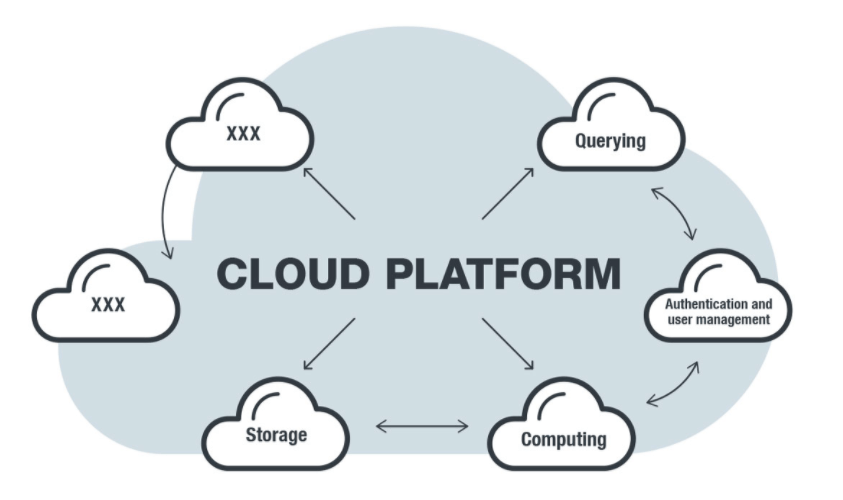
Cloud security works on the same principle as the pull-up challenge: doing things the hard, correct way leads to lasting results. In cloud security, if you make permissions too loose or skip essential controls, it seems easier—just like doing easier pull-ups. But real security comes from applying restrictions such as least privilege, multi-factor authentication, and segmentation. These are to security what strict form is to strength: they are challenging but essential for durability.

2. Form Is Discipline
Locking out every rep is about integrity. Cutting corners in training leads to cutting corners under stress.

Cyber pros know the drill: if you skip patch cycles, code reviews, or alerts, you won’t suddenly excel in a crisis—you will perform only as well as your training prepared you. The point is: in emergencies, people don’t ‘rise to the occasion’; they revert to their standard preparedness.

3. Speed Comes From Structure
Strict pull-ups in just over 2 minutes require planning: strict adherence to set sizes, rest, and when to push or hold back.

Incident response follows the same principle: structured speed is essential. Success comes from following practiced processes, not from last-minute effort.

4. Resilience Beats Flash
Nobody remembers the person who did 20 kipping pull-ups that looked good on Instagram but didn’t count in this instance. The athletes who succeed in the gym or in life are those who can perform strict reps under pressure, year after year.

Resilience isn’t glamorous. It’s strict adherence to form and standards. Reps stacked and basics drilled.

Closing Thoughts

Thirty strict pull-ups for time really isn’t about the number. It’s about the mindset: constraints, no ego, and the discipline not to go again sooner than you can complete at least another set of 5, along with persistence under pressure.

The lessons extend beyond workouts. Whether you’re securing cloud environments, writing policies, or leading teams, following real constraints, practicing discipline, and building resilience are as vital as adhering to strict form in your pull-ups when required.

Constraints can make you sharper. Discipline makes you stronger. Resilience makes you unbreakable.

Persistence Beats Perfection

Chasing perfection can be tempting. It makes us believe that if we get everything exactly right, like following a flawless training plan or a perfect patch cycle, we’ll be safe from risks or mistakes. But perfection is fragile. One mistake or setback, and it falls apart. That’s when persistence matters most.

Persistence, on the other hand, is unbreakable and endures where perfection falters.

Anyone who’s trained in martial arts or strength sports knows some days you set PRs, some days you don’t. Some days you win; other days, you learn. The outcome of a single session doesn’t matter; what counts is that you keep showing up.

Cybersecurity runs on the same principle. Rather than expecting flawless results, it relies on the daily commitment, running scans, monitoring logs, and applying updates, which builds resilience over time.

Why Perfection Fails

  • Unrealistic expectations: Nobody patches everything at once. Expecting to do so leads to burnout.
  • Procrastination: Waiting until you can do it “perfectly” means it never gets done.
  • Fragility: Perfection breaks under stress; persistence adapts.

Why Persistence Wins

  • Consistency compounds. One small patch today, another tomorrow, adds up to systemic strength.
  • Resilience under pressure. When incidents occur, teams that have developed daily habits respond more quickly.
  • Adaptability. Persistence isn’t rigid; it bends, adjusts, and continues forward.

The Martial Arts Parallel

Martial artists don’t achieve mastery through perfection. They drill basics until instinctive, spar, fail, and adapt. Each session is about persistence; the discipline of returning to the mat, working on strikes, footwork, counter-wrestling, etc, etc.

Cybersecurity professionals must do the same. Drill, repeat, refine, and drill some more. That way, when the attacks come, your persistence in training wins the day.

Closing Thought:
Persistence, not perfection, is the key to success. Perfection is unattainable, persistence ensures progress, and tangible results.

The Cloud’s Silent Killer: Misconfigured Defaults

shannon cloud security

When you think of a data breach, you might envision elite hackers executing sophisticated attacks. However, the reality is far more alarming and preventable. Most breaches are the result of basic, avoidable misconfigurations, such as open buckets and overly broad permissions. These are mistakes anyone can make, and attackers are counting on it.

It’s tempting to trust default settings, they feel safe, like the standard path everyone takes. But most cloud defaults are built for quick setup, not lasting security. If you let them go unchecked, you’re leaving the door wide open for disaster.

The Usual Suspects

Let’s talk specifics. Over and over again, these defaults show up in post-mortem reports:

  • Open storage buckets and blobs: Data storage left publicly accessible, sometimes with read and write permissions wide open. Attackers do not need to guess. They simply scan and find these vulnerabilities.
  • Overly permissive IAM roles: The infamous *:* permission set (which allows access to all resources), granting far more access than necessary. It only takes one compromised credential to turn this into a complete takeover of the environment.
  • Unrestricted security groups: Allowing traffic from “anywhere, any time” because it worked during testing… and then nobody locked it down.

These aren’t rare oversights. They’re everywhere, so common that attackers make a living scanning the internet for them. If you don’t fix them, it’s only a matter of time before someone else finds them first.

Why Defaults Are So Dangerous

  1. They lure you into a false sense of security, making you believe all is well until it’s far too late.
    Teams assume that “default” means “safe enough.” But in reality, cloud vendors prioritize usability over airtight security.
  2. They scale the wrong way.
    What seems harmless in one instance becomes catastrophic when duplicated across dozens of accounts, regions, and services.
  3. They’re hard to spot once deployed.
    Without deliberate reviews, defaults blend into the noise. They look “normal,” even when they’re wide open.

Breaking the Cycle

So how do you stop defaults from turning into disasters?

  • Audit your configurations against standards. Frameworks like CIS Benchmarks exist for a reason. They help ensure your usual settings are not leaving the door wide open.
  • Enforce least privilege from the start. Treat it as your default stance. Add access only when necessary, and remove it just as quickly.
  • Build guardrails into Infrastructure as Code. With tools like Terraform, CloudFormation, or ARM templates (methods for defining infrastructure settings in code), you can embed security policies that prevent dangerous defaults from being introduced unnoticed.
  • Automate reviews and alerts. Cloud-native tools (such as AWS Config, Azure Policy, or GCP Security Command Center services) and third-party scanners can flag risky defaults before attackers do.

The Martial Arts Parallel

In martial arts, the stance you start with can determine the fight. A weak stance means you begin off balance before your opponent moves.

Cloud defaults work the same way. If you start with insecure settings, attackers already have the upper hand before you realize there’s a problem.

Closing Thoughts

The cloud makes it easy to move quickly, but speed without careful planning can be risky. Default settings may save you time, but they also make things much easier for attackers. Cloud security is not about dramatic battles or brilliant hackers. It is about consistently following basic best practices. Never assume that default means secure. Take responsibility and set your own standards.

Fueling Your Cybersecurity: How To Eat Right for Cyber Success

Cybersecurity incidents don’t care how well you slept or ate. They happen anytime. If your body feels slow, your mind will too.

That’s why nutrition isn’t just about physique or gym numbers. It’s about resilience.

A strong body fuels a sharp mind, which makes you a stronger IT professional.

Before jumping in, you might ask: how do you build nutrition habits that fuel performance, even under pressure? Let’s break it down with these five rules:

Rule #1: Always Eat Protein First

If there’s one macro nutrient that changes everything, it’s protein. Most people under-eat it, even those who train.

  • Why it matters: Protein saves muscle, keeps you full longer, and helps your body burn more calories.
  • Aim for .75 to 1g per pound of lean or target body weight. Spread it across meals: eggs at breakfast, chicken or beef at lunch, fish at dinner, or a shake if needed.

Think of protein like a system update: without it, your body gradually weakens until you notice it, and by then it’s too late.

Carbs, like protein, provide 4 calories per gram.

Carbs get demonized needlessly. If you train hard, they’re your gas pedal—not optional.

  • Performance: Carbs fuel high-intensity efforts (CrossFit, sprints, heavy lifts). They refill glycogen so your “engine” doesn’t sputter.
  • Focus: Complex carbs—including all fruits, vegetables, and grains like rice—keep blood sugar steady. That means steady energy and fewer crashes.

The key isn’t cutting carbs. What matters is eating quality carbs at the right times.

  • Hard training days? Eat more.
  • Recovery days? Dial it back a bit.

Rule #3: Fats – The Slow-Burn Energy Source

Fats do not give quick energy like carbs, but they help you last longer. Fats are essential for hormone production, brain function, and recovery.

  • Prioritize avocados, nuts, olive oil, walnut oil, and sesame oil, as well as grass-fed, wild-caught and free-range meats.

Most people do well with 20–30% of their calories from fat. That’s enough for health but not too much.

Rule #4: Hydration = Cognitive Uptime

Mild dehydration tanks focus faster than hunger. For IT pros, that’s dangerous.

  • Target: ½ gallon per day minimum.
  • Use electrolytes during long training or extended incident calls.

Think of hydration as uptime. Skip it, and your system crashes.

Rule #5: Structure Beats Willpower, Every Time

No one does well by guessing. Like securing a system, lasting results come from discipline and routine.

  • Meal prep → Simple, repeatable meals built ahead of time.
  • Macro targets: track for a few weeks until you get the feel.
  • Boundaries: Sleep, fuel, and downtime are mandatory security controls.

The goal is not perfection; it’s persistence. Remember, chasing perfection can actually slow your progress. Aim for 80 to 90 percent consistency for the best results.

Closing Thoughts

Nutrition is about training, discipline, and resilience, and it all starts with each meal.

Forget fad diets, quick fixes, and guilt. Focus on what helps you daily: sufficient protein, good carbs, healthy fats, water, and sticking to a plan that eliminates guesswork.

Anyone with a strong body and sharp mind doesn’t just survive the grind; they thrive in it.

Soon, I’ll show you how to build simple, sustainable meal prep systems. You can protect your body and mind just like you protect your network: with structure and planning.

Training the Body, Training the Mind: Why Security Pros Need Both

training the body trains the mind

Top 5 Cybersecurity Mistakes I See Every Week (and How to Fix Them)

1. Weak or Reused Passwords

mike epps, top flight security, friday after next

The problem: People still lean on “123456” or reuse the same password across 10 accounts. Attackers love this.
The fix: Use a password manager and enable multi-factor authentication (MFA) everywhere it’s offered.

2. Ignoring Updates and Patches

The problem: That little “remind me later” button gets clicked… and suddenly, a known vulnerability is wide open for weeks.

The fix: Automate updates where possible. For servers and enterprise systems, schedule a patch management routine — monthly at minimum.

3. Cloud Misconfigurations

the breakdowns can be voluminous

The problem: Buckets, blobs, and databases left wide open to the internet. It’s not just bad practice — it’s a breach waiting to happen.
The fix: Review permissions regularly. Use least privilege access. Run configuration scans against frameworks like CIS Benchmarks.

4. Phishing Clicks

who's got your six? matt shannon security pro

The problem: A single click on a fake invoice or “urgent” email can compromise a network. It still works because people are busy and distracted.
The fix: Train employees continuously, not just once a year. Teach them to hover over links, verify senders, and report suspicious emails.

5. Lack of Logging and Monitoring

The problem: Breaches often go undetected for weeks because no one’s watching the logs.
The fix: Centralize your logging (think SIEM, EDR, or even cloud-native tools) and set alerts for suspicious activity. Logs don’t stop attacks — but they stop you from being blind.

Closing Thoughts

Discover & Fingerprint: Nmap flags you should actually know (and when to use them)

Discovery and fingerprinting are where recon stops being guesswork and starts being a map. Over the next few weeks I’ll dig into Nmap and other recon tools — for now, here’s a compact, practical list of Nmap switches worth committing to memory for pentesting exams and real-world ops. Don’t just memorize the letters — learn the purpose and the use case.

Basic target input / listing

  • nmap -iL targets.txt
    Scan targets from a file. Use when you have a long list to automate.
  • nmap -iR 100
    Scan 100 random hosts. Good for practice/learning about global scanning patterns in a lab.
  • nmap 192.168.1.10 -sL
    List-only — no probes. Use to verify target resolution without touching ports.

Host discovery vs port scan

  • nmap 192.168.1.1/24 -sn
    Ping/host discovery only (no port scan). Fast way to find live hosts on a subnet.
  • nmap 192.168.1.1-5 -Pn
    Skip host discovery (treat hosts as up). Useful when ICMP/ARP are blocked but you still want to try ports.

Port specification

  • nmap 192.168.1.1 -p 21
    Scan a single port (FTP, in this example).
  • nmap 192.168.1.1 -p 21-100
    Scan a specific port range. Use when you want targeted scanning (faster than full 65k).

Service & OS fingerprinting

  • nmap 192.168.1.1 -sV
    Service/version detection. Helps identify vulnerable versions (e.g., out-of-date FTP/SSH).
  • nmap 192.168.1.1 -O
    Remote OS detection (TCP/IP stack fingerprinting). Useful when you need OS-level attack vectors.
  • nmap 192.168.1.1 -A
    Aggressive: OS detection + version detection + scripts + traceroute. Good for a quick, deep look — loud and obvious on the network.

Timing / IDS evasion

Timing templates adjust scan speed and stealth. Choose based on network reliability and detection risk.

  • -T0 Paranoid — ultra-slow. Used to evade IDS or noisy logging systems.
  • -T1 Sneaky — very slow.
  • -T2 Polite — slows scans to reduce bandwidth/impact on target.
  • -T3 Normal — default.
  • -T4 Aggressive — faster, assumes stable network.
  • -T5 Insane — very fast; only on extremely reliable links or internal lab networks.

Memory tricks & practical tips

  • I/O flags: -iL = Input List. File-based scanning automation.
  • List-only: -sL — “List targets only.” No probing.
  • Host discovery: -sn = scan no ports (ping only).
  • Skip discovery: -Pn = treat hosts as Up (No ping).
  • Service info: -sV for service Version, -O for OS.
  • One-shot vs range: -p 21 vs -p 21-100. Single vs range.
  • Aggressive -A = one-shot deep recon; loud but thorough.
  • Timing -T# = speed vs stealth. 0 is slowest/most stealthy; 5 fastest.

Mini workflows (real use-cases)

  • Quick inventory on a subnet:
    nmap 10.0.0.0/24 -sn → find live hosts, then nmap -sV -p 22,80,443 <host> for details.
  • When ICMP blocked:
    nmap -Pn -p 1-1000 <host> → skip discovery, probe ports directly.
  • Stealth check in an IDS lab:
    nmap -T1 -sV <host> → slow timing to reduce IDS noise.
  • Full noisy recon in a lab environment:
    nmap -A -T4 <target> → quick comprehensive view.

Closing — don’t memorize blindly

The exam question isn’t “what flag is X” — it’s “which flag solves this problem.” Memorize the purpose and practice applying them in labs. Over the coming weeks I’ll publish deeper examples for each of these switches, show script usage, and map Nmap output to real exploitation workflows.