Security Without the Pessimism: Phishing 2.0 – How Smart People Still Get Hooked

When Experience Becomes the Blind Spot

You’ve been in tech long enough to spot the obvious scams. They have bad grammar, sketchy links, and the “urgent” password resets that scream, “It’s a trap.”

Modern phishing is designed for experienced professionals, people just like you.

The senior engineer who knows better.
The manager who moves fast.
The admin is juggling too many tabs.

Phishing 2.0 targets the confident, not the naive.

Because overconfidence, that quiet, “I’d never fall for that,” is exactly what gets exploited.

How Phishing Evolved While We Were Busy

Old-school phishing was obvious: typos, weird logos, fake banks. Now? It’s clean, professional, and personalized.

Attackers scrape LinkedIn, GitHub, and Slack leaks, as well as any other platform where they can learn who you are and how you communicate. Then they build emails that sound right.

“Following up on that architecture review.”
“Can you sign off on the AWS access request?”

No panic. No red flags. Just believable context. Phishing’s power now lies in familiarity, not just deception.

The Psychology And Why Smart People Click Anyway

It’s not ignorance. It’s pattern recognition. Your brain runs on shortcuts. You see what fits your norm and fill in the rest. “This feels familiar, so it’s safe.”

Layer on fatigue, distraction, or context switching, and even the most security-conscious person can click the wrong thing.

Attackers don’t need to outsmart you, they just need to catch you mid-scroll.

The Real Tricks How Phishers Use Your Own Systems Against You

Phishing 2.0 thrives inside your workflow:

  • Cloud notifications: “New file shared with you.”
  • Team apps: Slack, Notion, or Asana lookalikes.
  • Vendor portals and HR systems: identical clones.
  • QR codes: the new “scan to verify” scam.

Attackers don’t mimic strangers anymore; they mimic your routine.

The antidote, and our greatest protection, is patience.

Forget fear. Focus on tempo.

Build a habit of thinking first, then reacting. Believe me, I know it sounds elementary and maybe even silly, but people do it every day. It reminds me of the old saying from the range: “ready, fire, aim” versus “ready, aim, fire.” People are often too quick to react without pausing to think first.

That moment of pause between seeing and clicking is what saves the enterprise. So, always:

  • Hover first. Always.
  • Verify context: Does it match your current workflow?
  • Cross-check by text or chat before responding.
  • Trust your instinct; hesitation usually means something’s off.

Security isn’t about paranoia. It’s about building patience as your strongest defense.

Culture Over Blame

Curiosity beats compliance. Blaming users for falling for a phishing attempt isn’t awareness training or good security; it’s just scapegoating. People click because they’re human, not because they don’t care.

If your environment rewards speed over care, mistakes are inevitable. Instead of punishment, build openness to conversation. A strong security culture treats “I think I clicked something bad” as a start, not a sin.

Curiosity beats complacency every time.

Final Thought

Phishing 2.0 isn’t just a tech problem; it’s a problem of pace. Attackers take advantage of our work tempo. The faster we move, the easier it is to miss what matters.

The best security upgrade?

Breathe. Scan well. Challenge every unfamiliar link or request. Pause before you click, verify before you act, and encourage your team to do the same.

That’s not being cynical or pessimistic.
That’s the difference: real security means trained, patient awareness every day.

Security Without Pessimism: Why “Just One Click” Can Still Break Everything

The Myth of the Harmless Click
It’s late on a Friday afternoon. You’ve taken back-to-back phone calls, your inbox is overflowing, and your caffeine is slowly but surely fading. Then comes one last email. It’s something from HR about a new hire policy update.

You click, skim, and move on.

Five minutes later, that “harmless” click starts a slow-motion domino fall. Credentials harvested, tokens stolen, access expanding, all before you’ve even closed your laptop.

People think, “It was just one click.”
That’s the point. It only ever takes one.

The Domino Effect
Here’s what happens after that moment most people never see.

That fake login page doesn’t just steal your password, it grabs your session cookies, mimics your device fingerprint, and jumps the line of trust. Suddenly, it’s you logging in from a new location, sending a file, approving an invoice.

Once inside, attackers don’t move fast. They move quietly. They study your company like a playbook, structure, tone, and approval chains. The next email they send looks even more real because it’s built with your real data.

By the time anyone notices, the damage has often been done for days.

But why do we fall for it? The answer isn’t carelessness—it’s psychology.

The Psychology of the Click
No one falls for this because they’re careless. They fall because they’re human.

Attackers know when we don’t double-check: near quitting time, maybe when you’re experiencing that post-lunch carb crash, or when you’re in a rush to make that 9am meeting. All of those moments when we see what we expect to see. They don’t need to hack your brain, they simply nudge it the right way.

Speed, familiarity, and trust are their sharpest weapons, which is why “training” alone doesn’t solve the problem. Awareness isn’t a habit. The mind knows better, but the hand clicks first.

How Attackers Exploit Normalcy
Modern phishing doesn’t seem sketchy; it seems routine.

They copy internal phrasing, familiar names, work to perfect internal branding. The trick isn’t panic anymore, it’s comfort and familiarity.

Common triggers:

  • “Quick update before the weekend.”
  • “Need approval by end of day” or “close of business.”
  • “Can you confirm this invoice?”

Nothing dramatic. That’s the point. The hook isn’t fear, it’s familiarity.

How to Build a Click Buffer
You can’t eliminate every threat, but you can slow the chain reaction.

Build a Click Buffer. Think of it as a two-second pause that keeps good habits automatic:

  • Hover before you click. Make it reflex.
  • Check the sender domain. If it looks almost right, it’s wrong.
  • Stop treating “urgent” as a priority. Urgency is a tactic, not truth.
  • Ask IT. They’d rather you check 100 false alarms than clean up one breach.

A brief pause can equal a big payoff. Security starts with seconds, not software.

Culture Over Blame
Here’s where most companies stumble: they turn mistakes into shame. Someone clicks a bad link, and suddenly they’re the subject of the next slide in “staff security awareness training.”

That doesn’t build security, it builds silence.

A healthy culture rewards curiosity. If people feel safe saying, “Hey, I think I messed up,” the damage stops faster, every time.

You can’t stop every click. However, you can build a team that identifies, shares, and learns from mistakes before they spiral out of control.

Final Thought
The real security upgrade isn’t another tool or rule to apply, it’s simply learning to breathe and take a little extra time to pause before you click.

  • One breath before the click. One second to hover over the link.
  • One habit that keeps the rest intact.
  • That’s not fearmongering.
  • That’s just good hygiene.

If you found this helpful, please share it with your team or reflect on your own scanning and clicking habits. Security is a team effort and every small pause makes a difference.

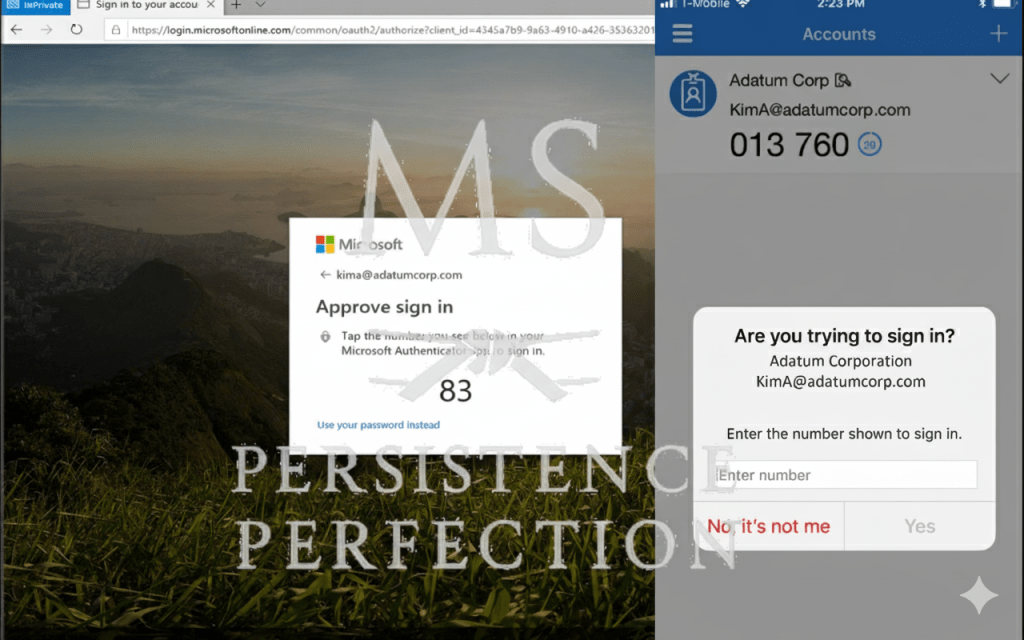
Multi-Factor Authentication: Boring, Annoying, Essential

In cybersecurity, we get excited about new technologies like AI, zero trust, and quantum encryption. But ask any practitioner what quietly stops the most breaches day to day? It’s still MFA.

Multi-Factor Authentication may not be exciting. It can slow people down and sometimes feels awkward. Even so, it remains one of the best ways to stop credential theft, which is the most common way attackers get into any network.

Why MFA Matters

• Passwords are weak. People reuse them across accounts, attackers buy them on the dark web, and “123456” still shows up in breach data.
• Phishing is effective. Users still click links and enter credentials. MFA blocks stolen passwords from being enough.
• Attacks are automated. Bots hammer login pages at scale. MFA breaks that automation by forcing a second factor.

Despite everything we know, MFA is still the easiest and most effective step in cyber defense. It often makes the difference between stopping an incident and having to respond to one.

The Pushback Problem

When we first rolled out MFA our district, the resistance was loud.

“It’s annoying.”
“It slows us down.”
“We don’t have time for that.”
“Why do I need this if I’m just checking email?”

At first, security changes can feel like a big hassle for everyone, whether you’re a teacher, technician, or leader. But a few seconds of extra effort can save us from days or even weeks of problems.

To make sure everyone accepted MFA, we took our time and built support step by step:

• Continuous staff education. Regular updates explained the “why” behind MFA, not just the “how.”
• Knowledge-base articles gave our help desk a clear playbook, no scrambling when someone was locked out or confused.
• Anticipating questions became part of the rollout strategy. From custodians logging into shared workstations to the superintendent approving district-wide communications, everyone got personalized guidance.

We kept the message clear: MFA is not a burden. It’s part of how we protect our entire staff and precious student PII, and PHI data. We aways have to remain FERPA, COPPA, CIPA, and PPRA compliant.

Over time, the complaints faded. Now, using MFA is second nature. It’s simply part of our routine.

The Fix

• Enforce MFA on all critical systems.
• Use phishing-resistant methods (authenticator apps, hardware keys) and worst-case scenario SMS.
• Train users that a few extra seconds of friction is the cost of resilience.

The Parallel

Using MFA is similar to wrapping your hands before boxing. It might seem tedious when you’re just getting started, but it protects you. If you skip it once, you might be fine, but skip it again, and you risk real trouble.

Security, like weightlifting, CrossFit, martial arts or meal prep it works best when the basics become instinct.

Again, MFA is boring. But, it’s also one of the most powerful shields you have.

Top 5 Cybersecurity Mistakes I See Every Week (and How to Fix Them)

1. Weak or Reused Passwords

mike epps, top flight security, friday after next

The problem: People still lean on “123456” or reuse the same password across 10 accounts. Attackers love this.
The fix: Use a password manager and enable multi-factor authentication (MFA) everywhere it’s offered.

2. Ignoring Updates and Patches

The problem: That little “remind me later” button gets clicked… and suddenly, a known vulnerability is wide open for weeks.

The fix: Automate updates where possible. For servers and enterprise systems, schedule a patch management routine — monthly at minimum.

3. Cloud Misconfigurations

the breakdowns can be voluminous

The problem: Buckets, blobs, and databases left wide open to the internet. It’s not just bad practice — it’s a breach waiting to happen.
The fix: Review permissions regularly. Use least privilege access. Run configuration scans against frameworks like CIS Benchmarks.

4. Phishing Clicks

who's got your six? matt shannon security pro

The problem: A single click on a fake invoice or “urgent” email can compromise a network. It still works because people are busy and distracted.
The fix: Train employees continuously, not just once a year. Teach them to hover over links, verify senders, and report suspicious emails.

5. Lack of Logging and Monitoring

The problem: Breaches often go undetected for weeks because no one’s watching the logs.
The fix: Centralize your logging (think SIEM, EDR, or even cloud-native tools) and set alerts for suspicious activity. Logs don’t stop attacks — but they stop you from being blind.

Closing Thoughts

The Top Nine Ways to Avoid Being Hacked: Essential Tips for Staying Safe Online

Cyber threats are everywhere. Learn nine expert-approved cybersecurity practices, from password hygiene to phishing prevention, that help protect your data, privacy, and peace of mind.

In today’s hyperconnected world, being hacked isn’t just a risk — it’s a near inevitability if you’re not prepared. Whether you’re an individual, a small business owner, or part of a larger organization, protecting your data should be a daily habit, not an afterthought.

Hackers exploit the smallest cracks: weak passwords, outdated software, and misplaced trust. The good news? A few consistent habits can make you a far harder target.

Here are nine proven ways to reduce your risk of being hacked, simple, practical, and backed by modern cybersecurity best practices.

  1. Use Strong, Unique Passwords

Weak or reused passwords remain one of the top causes of account compromise.
A strong password should be:

  • At least 12 characters long
  • Include a mix of upper and lowercase letters, numbers, and symbols
  • Avoid personal details like your pet’s name or birthday

Pro Tip: Use a password manager to create and store unique credentials safely — it’s far more secure than your memory (or sticky notes).

2. Enable Multi-Factor Authentication (MFA)

If passwords are your front door, MFA is your deadbolt.
This simple tool requires an additional verification step — like a text message code or an authentication app prompt — before granting access.

Even if a hacker steals your password, MFA can stop them cold.
Enable it everywhere you can: email, banking, social media, and especially your work accounts.

  1. Keep Software and Systems Updated

Cyber attackers love outdated software — it’s like an open window.
Enable automatic updates on your devices, browsers, and security tools to patch vulnerabilities before attackers can exploit them.

Updates aren’t annoyances; they’re armor.

4. Spot and Stop Phishing Scams

Phishing remains the #1 way users get hacked.
Attackers use fake emails or messages that mimic trusted sources to trick you into clicking malicious links or revealing credentials.

Stay sharp:

  • Check sender addresses carefully
  • Hover over links before clicking
  • Be skeptical of urgent or emotional language (“Your account will be suspended!”)
  • When in doubt, contact the organization directly

Education here pays off, once you’ve spotted a good phish, you’ll never unsee the patterns.

  1. Secure Your Home Network
  • Your Wi-Fi router is the gateway to everything on your home network.
  • Change the default password immediately after setup.
  • Use WPA3 encryption (the most secure standard).
  • Disable WPS and consider hiding your SSID.
  • Set up a guest network to isolate visitors and IoT devices.

A few minutes of setup can close the door on thousands of automated attacks.

  1. Use a Virtual Private Network (VPN)

When connecting to public Wi-Fi (airports, cafes, hotels) use a VPN to encrypt your internet traffic. This prevents hackers from intercepting data like login credentials and personal info.

Choose a reputable, paid VPN provider. (Free ones often collect your data instead of protecting it.)

7. Be Mindful of What You Share Online

Every social post is a breadcrumb. Hackers use personal details to guess passwords, craft phishing messages, or reset your accounts.

Limit what you share publicly, especially location check-ins and birthdates.
Remember: oversharing fuels social engineering — the human side of hacking.

  1. Regularly Back Up Your Data

Ransomware doesn’t work if your data is safely backed up.
Use the 3-2-1 rule:

  • 3 total copies of your data
  • 2 different storage types (cloud + external drive)
  • 1 kept offline

Automate backups and test them occasionally — a broken backup is no backup at all.

9. Educate Yourself and Your Circle

Technology changes fast — human habits change slowly. Stay updated on emerging threats, and share what you learn with coworkers, friends, or family.

Security awareness training and cybersecurity newsletters are excellent ongoing resources.

Cybersecurity is everyone’s job. The more we all understand, the safer we all become.

Final Thoughts

Avoiding being hacked isn’t about paranoia — it’s about preparation.
Each of these habits strengthens your security posture one layer at a time.

Think of cybersecurity as compound interest: small daily actions, multiplied over time, create unbreakable resilience.

Stay curious. Stay cautious. Stay secure.

*Updated October 2025: refreshed to reflect updated security practices for the modern threat landscapes.