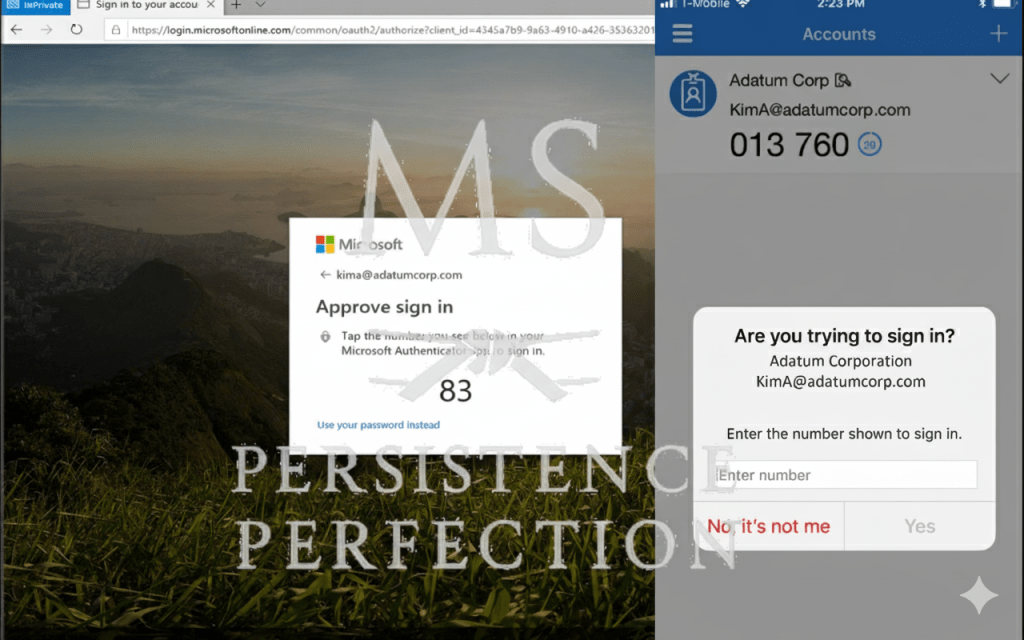
Multi-Factor Authentication: Boring, Annoying, Essential

In cybersecurity, we get excited about new technologies like AI, zero trust, and quantum encryption. But ask any practitioner what quietly stops the most breaches day to day? It’s still MFA.

Multi-Factor Authentication may not be exciting. It can slow people down and sometimes feels awkward. Even so, it remains one of the best ways to stop credential theft, which is the most common way attackers get into any network.

Why MFA Matters

• Passwords are weak. People reuse them across accounts, attackers buy them on the dark web, and “123456” still shows up in breach data.
• Phishing is effective. Users still click links and enter credentials. MFA blocks stolen passwords from being enough.
• Attacks are automated. Bots hammer login pages at scale. MFA breaks that automation by forcing a second factor.

Despite everything we know, MFA is still the easiest and most effective step in cyber defense. It often makes the difference between stopping an incident and having to respond to one.

The Pushback Problem

When we first rolled out MFA our district, the resistance was loud.

“It’s annoying.”
“It slows us down.”
“We don’t have time for that.”
“Why do I need this if I’m just checking email?”

At first, security changes can feel like a big hassle for everyone, whether you’re a teacher, technician, or leader. But a few seconds of extra effort can save us from days or even weeks of problems.

To make sure everyone accepted MFA, we took our time and built support step by step:

• Continuous staff education. Regular updates explained the “why” behind MFA, not just the “how.”
• Knowledge-base articles gave our help desk a clear playbook, no scrambling when someone was locked out or confused.
• Anticipating questions became part of the rollout strategy. From custodians logging into shared workstations to the superintendent approving district-wide communications, everyone got personalized guidance.

We kept the message clear: MFA is not a burden. It’s part of how we protect our entire staff and precious student PII, and PHI data. We aways have to remain FERPA, COPPA, CIPA, and PPRA compliant.

Over time, the complaints faded. Now, using MFA is second nature. It’s simply part of our routine.

The Fix

• Enforce MFA on all critical systems.
• Use phishing-resistant methods (authenticator apps, hardware keys) and worst-case scenario SMS.
• Train users that a few extra seconds of friction is the cost of resilience.

The Parallel

Using MFA is similar to wrapping your hands before boxing. It might seem tedious when you’re just getting started, but it protects you. If you skip it once, you might be fine, but skip it again, and you risk real trouble.

Security, like weightlifting, CrossFit, martial arts or meal prep it works best when the basics become instinct.

Again, MFA is boring. But, it’s also one of the most powerful shields you have.

Top 5 Cybersecurity Mistakes I See Every Week (and How to Fix Them)

1. Weak or Reused Passwords

mike epps, top flight security, friday after next

The problem: People still lean on “123456” or reuse the same password across 10 accounts. Attackers love this.
The fix: Use a password manager and enable multi-factor authentication (MFA) everywhere it’s offered.

2. Ignoring Updates and Patches

The problem: That little “remind me later” button gets clicked… and suddenly, a known vulnerability is wide open for weeks.

The fix: Automate updates where possible. For servers and enterprise systems, schedule a patch management routine — monthly at minimum.

3. Cloud Misconfigurations

the breakdowns can be voluminous

The problem: Buckets, blobs, and databases left wide open to the internet. It’s not just bad practice — it’s a breach waiting to happen.
The fix: Review permissions regularly. Use least privilege access. Run configuration scans against frameworks like CIS Benchmarks.

4. Phishing Clicks

who's got your six? matt shannon security pro

The problem: A single click on a fake invoice or “urgent” email can compromise a network. It still works because people are busy and distracted.
The fix: Train employees continuously, not just once a year. Teach them to hover over links, verify senders, and report suspicious emails.

5. Lack of Logging and Monitoring

The problem: Breaches often go undetected for weeks because no one’s watching the logs.
The fix: Centralize your logging (think SIEM, EDR, or even cloud-native tools) and set alerts for suspicious activity. Logs don’t stop attacks — but they stop you from being blind.

Closing Thoughts

Best Practices to Secure Data in a K-12 Environment

1. Implement Strong Access Controls

  • Role-Based Access Control (RBAC): Ensure that only authorized personnel have access to sensitive data. Assign permissions based on roles and responsibilities.
  • Multi-Factor Authentication (MFA): Require MFA for accessing sensitive systems and data to add an extra layer of security.

2. Regular Security Training and Awareness

  • Staff Training: Conduct regular cybersecurity training sessions for teachers, administrators, and support staff to recognize phishing attempts, social engineering, and other common threats.
  • Student Awareness: Educate students about safe online behaviors, the importance of password security, and how to avoid suspicious links and downloads.

3. Use Strong Password Policies

  • Complex Passwords: Enforce the use of strong, complex passwords that include a mix of letters, numbers, and special characters.
  • Password Management: Encourage the use of password managers to help staff and students manage their passwords securely.

4. Network Security

  • Firewalls: Deploy firewalls to protect the school’s network from unauthorized access and malicious traffic.
  • Intrusion Detection and Prevention Systems (IDPS): Implement IDPS to monitor and respond to potential threats in real time.
  • Segmentation: Segment the network to limit access to sensitive data and reduce the attack surface.

5. Data Encryption

  • Encryption at Rest and in Transit: Ensure that all sensitive data is encrypted both when stored and when transmitted over the network.
  • Secure Communication Channels: Use secure protocols like HTTPS, SSL/TLS, and VPNs for remote access and data transfer.

6. Regular Updates and Patch Management

  • Software Updates: Keep all software, including operating systems, applications, and security tools, up to date with the latest patches and security fixes.
  • Automated Patch Management: Use automated tools to manage and apply patches consistently and promptly.

7. Regular Backups and Disaster Recovery Planning

  • Data Backups: Perform regular backups of critical data and store them securely offsite or in the cloud.
  • Disaster Recovery Plan: Develop and regularly test a disaster recovery plan to ensure quick recovery from data breaches, ransomware attacks, or other disruptions.

8. Endpoint Security

  • Antivirus and Anti-Malware: Install and maintain up-to-date antivirus and anti-malware solutions on all devices.
  • Mobile Device Management (MDM): Use MDM solutions to manage and secure mobile devices used by students and staff.

9. Application Security

  • Secure Software Development: Ensure that applications developed or used by the school follow secure coding practices and are regularly tested for vulnerabilities.
  • Third-Party Applications: Vet and monitor third-party applications for security compliance before integrating them into the school’s IT environment.

10. Physical Security

  • Secure Access to Facilities: Implement physical security controls like locks, access badges, and surveillance cameras to protect areas where sensitive data is stored.
  • Device Management: Ensure that devices such as laptops, tablets, and USB drives are securely stored and tracked.

11. Incident Response and Management

  • Incident Response Plan: Develop and maintain a comprehensive incident response plan outlining steps to take in the event of a data breach or security incident.
  • Regular Drills: Conduct regular incident response drills to ensure that staff are prepared to handle security incidents effectively.

12. Compliance and Auditing

  • Regulatory Compliance: Ensure compliance with relevant regulations such as FERPA (Family Educational Rights and Privacy Act) and COPPA (Children’s Online Privacy Protection Act).
  • Regular Audits: Conduct regular security audits and assessments to identify and address vulnerabilities and ensure ongoing compliance with security policies.